You will get Ufone 4G Internet for free, with this method. You have to follow all these few steps to get FREE internet, you have to try this for with balance less than Rs.175 because with this method if you have more than Rs.175 it will deduct your balance.
Any way stop intro here and let's move on.
NOTE: Unfortunately this offer has been ended now!
How to get free Ufone 4G Internet?
My Balance Before Getting Internet
All you have to do is just open Facebook Android Application, on the top click Go to Free Mode.
After you entered into Free Mode click See Photos.
Now you have to click any Data Pack to buy, But here we will buy the best package which 6 GB Internet in Rs. 175, just click BUY
Now click CONFIRM
And that's all boom you will receive a message that you got your internet package.
Now just check your remaining Data MB's dial *706#.
And that's you can get as much internet as you want.
Due to the success of Stronghold Crusader, Firefly's decided to make it harder, and strong. Firefly has added some challenge modes, maps, etc. Stronghold is a real-time strategy game, which makes it more interested and more enjoyable. I was a kid when I was playing it, but I still love and play it whenever I get free time, because I'm in a professional stage of my life, due to which I have a very short time.
People love it when they see that it have many more options live you have to manage your resources, defense system, and all other stuff. You can change its view perspectives you can attack your opponents and can get or send help to your alias.
Crusader extreme is not for softcore players, if you are a softcore or can play a game with hard mode, I will suggest you download Stronghold Crusader. If you are a hardcore player and want to play some hard battles, you go for Stronghold Crusader Extreme.
Though this game is paid on Firefly's website, you can download its full version for FREE here.
Screenshots of Crusader Extreme
Requirements
OS: Windows 10/8.1/8/7/XP/2000
CPU: Pentium® III 500 MHz
Video Memory: 64MB DirectX 8.1 Compatible
RAM: 128 MB RAM
Hard Drive: 850 MB Hard drive space
DirectX: v8.1
Game size: 780.52 MB
Sound Card: DirectX 8.1 Compatible
Additional Notes: GameRanger software will be installed for multiplayer matchmaking support
Keyboard: You can play it via the keyboard as well, in case you don't want to use the keyboard I will recommend + - buttons it will allow you to fast or slow down the game speed.
Just got another good for you, people. Stronghold Crusader, this game is one of the best games of my childhood and even still I'm playing Stronghold Crusader when I'm I feel free.
Stronghold: Crusader is the successor of Firefly Studios's 2001 real-time strategy video game Stronghold. Crusader has much in common with the original Stronghold but differs from its predecessor in the fact that the game is no longer set in England, instead of being set in the Middle East during the Crusades.
Stronghold Crusader was the king of its era. It's all logics and tactics are wonderful. I would recommend to play this game but keep in mind to set an alarm when to stop because this game will keep so much engaged that you will never want to leave it lmao. Anyway besides all the intro and all other stuff come straight to the point.
Screenshots of Stronghold Crusader
Requirements
OS: Windows 10/8.1/8/7/XP/2000
CPU: Pentium® III 500 MHz
Video Memory: 64MB DirectX 8.1 Compatible
RAM: 128 MB RAM
Hard Drive: 850 MB Hard drive space
DirectX: v8.1
Game size: 804.55 MB
Sound Card: DirectX 8.1 Compatible
Additional Notes: GameRanger software will be installed for multiplayer matchmaking support
Keyboard: You can play it via the keyboard as well, in case you don't want to use the keyboard I will recommend + - buttons it will allow you to fast or slow down the game speed.
Video Tutorial
Please note mirrors are the alternative links if one is not working use the other.
This is the best software for file compressor and decompressor. With this tool, you can extract RAR, TAR, ZIP, 7-ZIP, ISO and many other files. You can encrypt your file with a passkey.
Screenshots
Unregistered Version
Registered Version
Download
You may need to download WinRAR 5.80 first install that and then download its key for registration.
Password: focdownloads.blogspot.com (One-Click Copy Password)
Add the registration file "rarreg.key" in the following folder according to your windows bit version.
For 64bit: C:\Program Files\WinRAR For 32bit: C:\Program Files (x86)\WinRAR
Do you want to save bandwidth? or want to save stylesheets or javascript files for your blogger? For blogger you must need to have a files hoster or CDN, I will recommend you google drive, to host your file. It is FREE, and working as CDN too. So don't worry about this problem, I have the solution here for you. All you need to have a Gmail account. And then upload your files to google drive and make it accessible for anyone, and just place its URL inside your website HTML file.
How to Host Stylesheet and Javascript files on Google Drive
Before the Bootstrap CSS
HTML Code without Bootstrap
Output
Step 1:
Login to your google drive, and upload your CSS and JS files.
Step 2:
Once your files uploaded, you have to share it with anyone, change its sharing property.
Right click on the file you uploaded, then click Share.
Now choose advanced.
Now change "Who has access" from private to public
First, choose Public on the web, and choose anyone Can View.
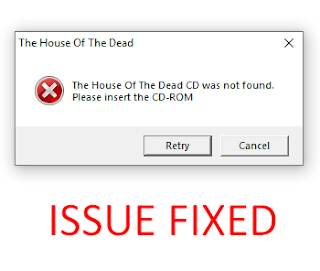
Are you getting the error "Please insert the CD-ROM"? It's OK you can fix it, some people will share cracks and a lot of stuff to bypass this error, I will never recommend using EXE crack, such files have a virus, malware, rats and more harmful stuff.
So, what is the legit way to fix this issue? First please don't relate it to The House Of The Dead only, It can occur on many other games as well such as Need For Speed II, Contra 1987, Aladdin 1993, Hercules 1997, Zuma Deluxe. I'm just using the THOTD game as an example.
How to fix "Please insert the CD-ROM"
This is very simple, all games that are developed in the 90's era or must require Direct X. In this modern era still, some games are using the old version of Direct X. Download DirectX R and install DirectX (R) Once you did you will no longer receive this error.
Microsoft DirectX is a graphic engine that allows the user to run multimedia mostly using for video games. All the games which were developed in the 90's era will require this engine to run that game.
An opening port is quite easy if you did everything perfectly. When I was trying to open port or forwarding a port I faced a lot of issues, First finding a good and accurate method on the internet in some cases is not easy, I tried on USB Dongle, I tried on DSL but unfortunately no success.
Sometimes windows firewall don't allow to Open a port, anyway, we will bypass that in this tutorial you have to follow me step by step to get rid of everything and open your port and enjoy.
Image source: openport.io
How to Forward/Open a Port
Step: 1
You need to have a software called Port Forward, click here to download it. Port Forward is trial software which will help us to bypass Windows firewall.
Step: 2
Login to your modem setting area, or modem panel. At my case my modem is PTCL, and panel URI is 192.168.10.1
After login, check your WAN Info and confirm it, which WAN Interface is connected, that assigned an IP to your computer.
Step: 3
Now go to Advanced Setup > NAT > Virtual Servers. Now you have to ADD a Virtual Server, Click on ADD
Step: 4
Now choose the WAN Use Interface which was connected in Step 2.
You can Select a Service or you can put a Custom Service name. Keep the following setting.
Custom Service = TestingPort
Status = Enable
External Port Start = 27051
External Port End = 27051
Protocol = TCP/UDP
Internal Port Start = 27051
Internal Port End = 27051
But, wait what about the Server IP Address: ?, We have to find it manually there are 2 ways to find it.
First: Open CMD and type ipconfig and hit ENTER
Under your network connection, IPV4 is your local machine IP address.
Second: Open your Network Properties. And you will find your IPV4 address there as well. I think the second one is more easy and accurate.
Now enter this IP Address into the Server IP Address, and click Apply/Save.
And that's all you did it.
Step: 5
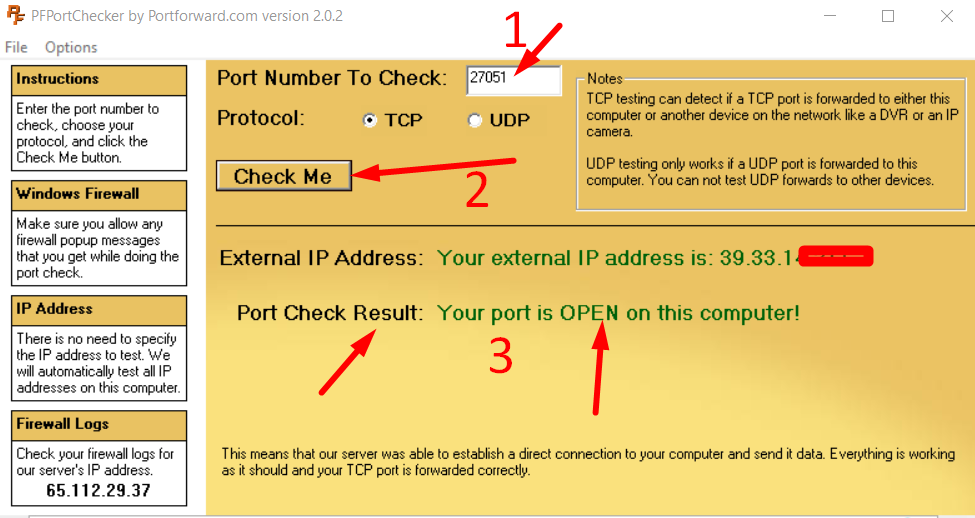
Let's go and verify it. First, you have to verify it using PortForward Software that you download in Step 1.
Once you have checked your port using PortForward and you got the result OPEN, its mean your Port is available to the public on the internet, so they can access your port using the public IP address and Port. You can check your port on various sites here I'm checking it with https://portchecker.co
Video Tutorial
If you have any question or facing problem you can simply comment below I try my best to help you out and fix the issue you are facing.